


Group expedition insurance
Travel insurance for group expeditions, run from one dashboard
Organising insurance for a whole expedition team usually means chasing a dozen people for a dozen policies. Our group portal gives you one dashboard for the roster, a private link for every traveller, and a clear view of who is covered and who still has a step to take.
Reviewed by Al Ste-Marie, Founder, Expedition Insure. Updated November 2026.
Why group trips are hard to insure
An expedition group is rarely uniform. Travellers live in different countries, join on different dates and want different amounts of cover. Each person still needs a policy in their own name, issued on the facts that apply to them.
That leaves the organiser in the middle: collecting details, answering questions and trying to confirm that everyone is covered before departure. The portal takes that work out of email threads and puts it in one place.
One organiser dashboard for the whole roster
Once your group is set up, you receive a private link to your organiser dashboard. From there you add travellers by name, email, age and country of residence, and send each one an invitation in the same step.
- Manage the roster. Edit a traveller's details, resend an invitation to anyone who has not bought yet, and message your account manager from the same screen.
- Share a join link. Create a self-join link for the group, copy it into your own trip emails, and rotate or revoke it whenever you want.

A private link for every traveller
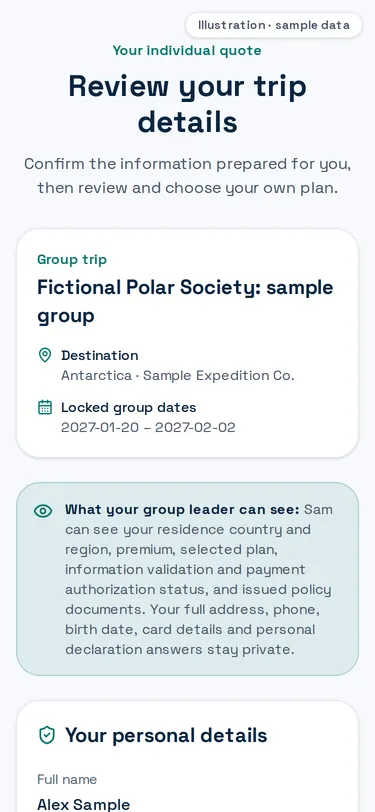
Each traveller gets their own member link. They confirm their details and travel dates, review the cover proposed for the group, and either complete their own purchase or, when the organiser is paying, confirm their details and add any extras. Nobody shares a login and nobody sends card details to the organiser.
Travellers who hear about the trip from you rather than from us can enrol through the group's join link. They are added to your roster and receive their own invitation.
Personal details stay personal. You see each traveller's country of residence, plan, price, payment status and issued documents. Their full address, phone number, date of birth, card details and declaration answers are not shown to you.
Cover the whole group on one card
If you, your organisation or the trip operator is paying, we can set the group up so the organiser covers everyone. Your account manager configures this when the group is created.
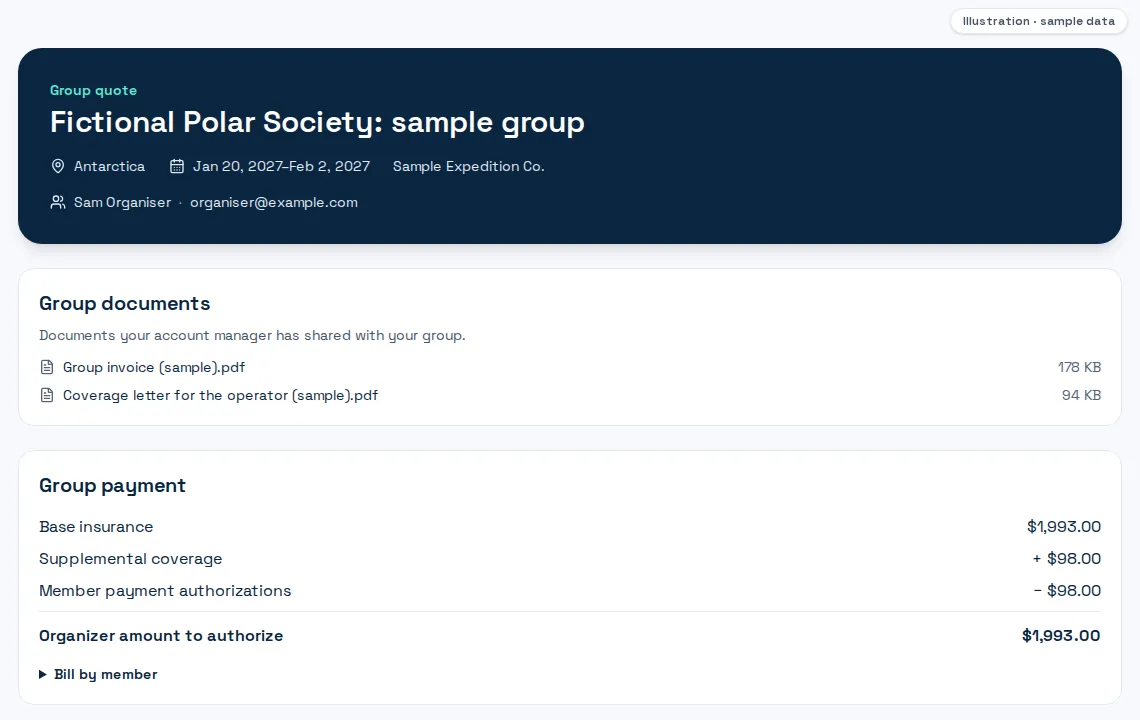
When the roster is final, you prepare the final group bill from your dashboard. Every traveller is priced again with the insurer, and you authorise one payment for the group through a secure card checkout. The card is held, not charged, until we start the purchase, and every payment is collected before any policy is bought.
- One authorisation. A single card hold for the group's base cover, with a receipt available in your dashboard once it is authorised.
- Nothing for travellers to pay. Travellers who keep the group's dates and cover see that the organiser has paid and have nothing to pay themselves.
Base cover from the organiser, extras from each traveller
On a sponsored group, the organiser pays for the base cover on the group's dates. A traveller who wants more than that can add it on their own member page and pay the difference themselves.
- Extra days. Travellers arriving early or staying on after the expedition can extend their cover before or after the group dates.
- Higher trip value. Travellers resident in the United States can insure a higher trip value than the group's base amount.
The traveller's extra is held on their own card and only charged when their policy is issued. Your group bill shows the base cover, the travellers' extras and the amount left for you, so the split is clear before you authorise anything.
See who is covered at a glance
Every traveller on the roster carries a status, from invited, to details in progress, to priced, to purchased and policy issued. The dashboard flags anyone who needs attention, such as an invitation that could not be delivered or a traveller missing an email address.
Open a traveller to see their plan, their latest price, whether their details are validated and the state of their payment. Once a policy is issued, its number and documents appear on the roster, and you can download every traveller's policy documents as one PDF once all of them are issued.
Invoices and group documents in one place
Your account manager shares group documents, such as your invoice or a coverage letter for the trip operator, in a documents section of your dashboard. You download them whenever you need them, rather than searching an inbox.
How group cover is arranged
Groups are set up with an account manager first, so the portal opens with the right trip, dates and cover already in place.
1. Tell us about the trip
Send the group enquiry below with your destination, dates and group size. Your account manager replies with the options for your group.
2. Receive your organiser dashboard
We set up the group and send you a private link to your dashboard, with the trip details already in place.
3. Invite your travellers
Add travellers one by one or share the join link. Each person confirms their own details on their member page.
4. Track cover to departure
Follow every traveller's status, pay for the group in one authorisation if you are covering it, and download policy documents once issued.
Group expedition insurance questions
Can I create a group online myself?
Does each traveller pay, or can the organiser pay for everyone?
Does every traveller get their own policy?
Our group lives in several countries. Is that a problem?
What happens when someone joins late or drops out?
Can we get an invoice for our finance team?
What can the organiser see about each traveller?
Planning a group expedition?
Tell us about the trip and your account manager will set up your group portal, so your travellers can get covered without the email chase.
Request a group quoteExpedition Insure is an insurance marketplace. Cover is provided by the insurer named on each policy, subject to its terms, conditions and exclusions. Screenshots show synthetic test data, not a real group.